[TOC]
Kubernetes配置管理ConfigMap 一、前言: 应用部署的一个最佳实践是将应用所需的配置信息与程序分离,这样可以使应用程序被更好地复用,通过不同的配置也能实现更灵活的功能。将应用打包为容器镜像后,可以通过环境变量或者外挂文件的方式在创建容器时进行配置注入,但在大规模容器集群的环境中,对多个容器进行不同的配置将变得非常复杂。
二、configMap简介(缩写:cm) 官网:https://kubernetes.io/zh-cn/docs/concepts/configuration/configmap/
1.2 ConfigMap概述 ConfigMap 是一种 API 对象,用来将非机密性的数据保存到键值对中 。使用时, Pods 可以将其用作环境变量、命令行参数或者存储卷中的配置文件。ConfigMap将你的环境配置信息和 容器镜像 解耦,便于应用配置的修改。
应用部署的一个最佳实践是将应用所需的配置信息程序进行分离Kubernetes 1.2ConfigMap。 ConfigMap具有命名空间隔离性!
1.3 ConfigMap用法
生成容器内的环境变量 。
以Volume的形式挂载为容器内部的文件或目录。
ConfigMap 以一个或多个key:value的形式保存在Kubernetes系统中供应用使用,既可以用于表示一个变量的值(例如name=maoxiansheng), 也可以用于表示一个完整配置文件的内容(例如server.xml=<? xml…>…)。
1.4 configMap创建方式 语法格式实例
1 2 3 4 5 6 7 8 9 10 11 12 13 14 15 16 17 18 19 20 21 22 23 24 25 26 27 28 29 30 31 32 33 34 35 36 37 38 39 40 41 42 43 44 45 46 47 48 49 50 51 52 53 54 --- apiVersion: v1 kind: ConfigMap metadata: name: game-demo data: player_initial_lives: "3" ui_properties_file_name: "user-interface.properties" game.properties: | enemy.types=aliens,monsters player.maximum-lives=5 user-interface.properties: | color.good=purple color.bad=yellow allow.textmode=true ======================================================================================================== apiVersion: v1 kind: Pod metadata: name: configmap-demo-pod spec: containers: - name: demo image: alpine command : ["sleep" , "3600" ] env: - name: PLAYER_INITIAL_LIVES valueFrom: configMapKeyRef: name: game-demo key: player_initial_lives - name: UI_PROPERTIES_FILE_NAME valueFrom: configMapKeyRef: name: game-demo key: ui_properties_file_name volumeMounts: - name: config mountPath: "/config" readOnly: true volumes: - name: config configMap: name: game-demo items: - key: "game.properties" path: "game.properties" - key: "user-interface.properties" path: "user-interface.properties"
1.4.1 通过目录的形式创建 1 2 3 4 5 6 7 8 9 10 11 12 13 14 15 16 17 18 19 20 21 22 23 24 25 26 27 28 29 30 31 32 33 34 35 36 37 [root@k8s-master01 ~] [root@k8s-master01 configmap] server { listen 80; server_name test.tanke.love; location / { root /data/test ; index index.html index.htm; } } EOF [root@k8s-master01 configmap] server { listen 80; server_name study.tanke.love; location / { root /data/study; index index.html index.htm; } } EOF [root@k8s-master01 opt] configmap/filedir created [root@k8s-master01 opt] NAME DATA AGE filedir 4 47s [root@k8s-master01 opt]
1.4.2 通过文件的形式创建 1 2 3 4 5 6 7 8 9 10 11 12 13 14 15 16 17 18 19 20 21 22 23 24 25 26 27 28 [root@k8s-master01 opt] name=zhangsan age=18 EOF [root@k8s-master01 opt] configmap/test01 created [root@k8s-master01 opt] apiVersion: v1 data: env.conf: | `name=zhangsan` `age=18` kind: ConfigMap metadata: creationTimestamp: "2024-06-23T14:40:53Z" name: env namespace: default resourceVersion: "413336" uid: 188258a8-e59d-43ae-9133-3a8fc95c92a7 [root@k8s-master01 opt] configmap/env02 created
--from-file=env02.conf=env.conf解析:–from-file=<新文件名称>=<源文件名称>
1.4.3 通过环境变量的形式创建资源 语法格式 :kubectl create cm <configMap名称> --from-env-file=<文件名称>
1 2 3 4 5 6 7 8 9 10 11 12 13 14 15 16 17 18 19 20 21 22 23 [root@k8s-master01 opt] name=mingge age=16 EOF [root@k8s-master01 opt] configmap/studyenv created [root@k8s-master01 opt] apiVersion: v1 data: `age: "16" ` `name: mingge` kind: ConfigMap metadata: creationTimestamp: "2024-06-26T13:40:15Z" name: studyenv namespace: default resourceVersion: "548674" uid: eacfb106-70bf-4ca9-bd27-21d11ec958d0
1.4.4 通过命令行的形式创建资源(了解) 语法格式 :kubectl create cm <configmap名称> --from-literal=<key>=<value> --from-literal=<key>=<value>
1 2 3 4 5 6 7 8 9 10 11 12 13 14 15 16 17 [root@k8s-master01 opt] configmap/testenv created [root@k8s-master01 opt] apiVersion: v1 data: `age: "88" `` `name: wangwu` kind: ConfigMap metadata: creationTimestamp: "2024-06-26T13:47:01Z" name: testenv namespace: default resourceVersion: "549644" uid: 64fd2dce-6310-440d-bdbf-7c50366e7eed
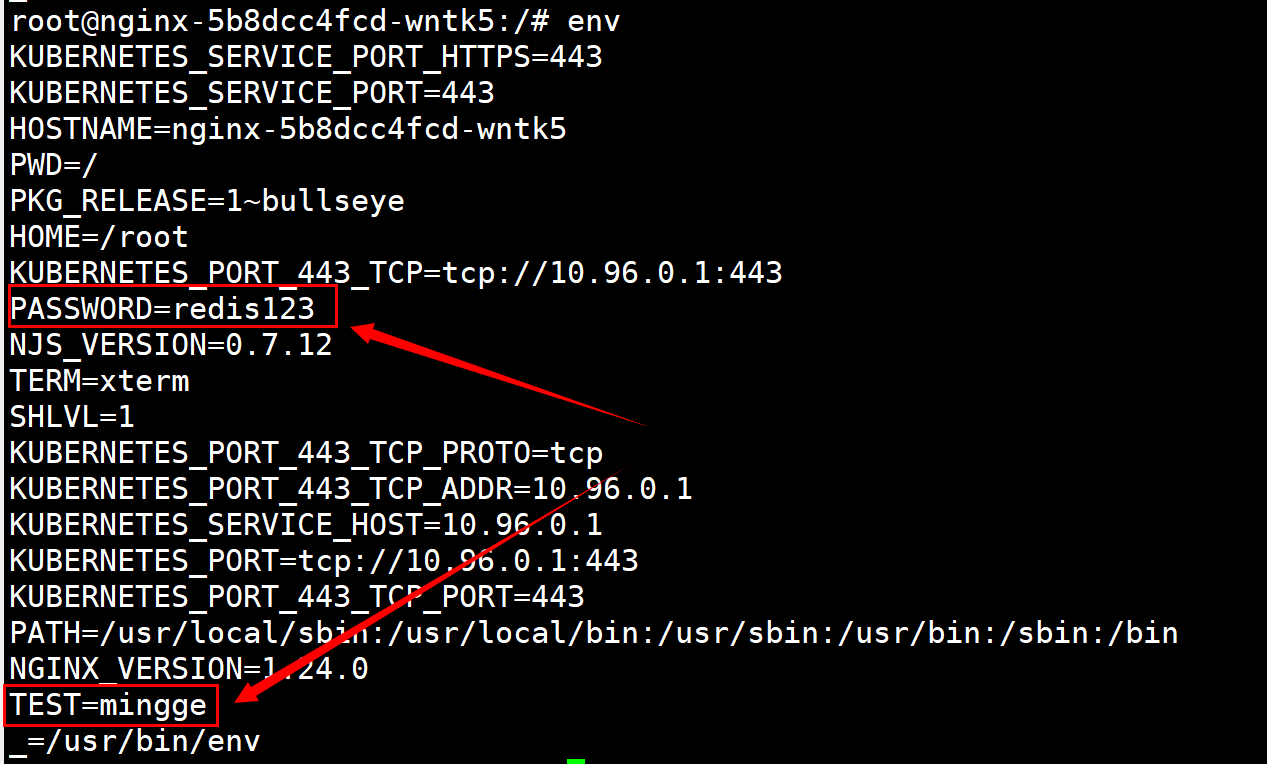
三、ConfigMap的配置使用 1.1 ConfigMap少数变量配置 1 2 3 4 5 6 7 8 9 10 11 12 13 14 15 16 17 18 19 20 21 22 23 24 25 26 27 28 29 30 31 32 33 34 35 36 37 38 39 40 41 42 43 44 45 46 47 48 49 50 51 52 53 54 55 56 57 58 59 [root@k8s-master01 opt]# cat >> test01.conf<<-EOF user=mingge EOF [root@k8s-master01 opt]# kubectl create cm test-env --from-env-file=test01.conf configmap/test-env created [root@k8s-master01 opt]# kubectl get cm test-env -oyaml apiVersion: v1 data: user: mingge kind: ConfigMap metadata: creationTimestamp: "2024-06-26T13:57:27Z" name: test-env namespace: default resourceVersion: "551140" uid: 425cc711-6a5b-4306-8063-3a84e6985060 [root@k8s-master01 opt]# vim nginx-deploy-cm-env.yaml --- apiVersion: apps/v1 kind: Deployment metadata: labels: app: nginx name: nginx spec: replicas: 1 selector: matchLabels: app: nginx template: metadata: labels: app: nginx spec: containers: - image: registry.cn-hangzhou.aliyuncs.com/hujiaming/nginx:1.24.0 name: nginx env: - name: PASSWORD value: redis123 - name: TEST valueFrom: configMapKeyRef: name: test-env key: user [root@k8s-master01 opt]# kubectl apply -f nginx-deploy-cm-env.yaml deployment.apps/nginx configured [root@k8s-master01 opt]# kubectl exec nginx-756f4447f4-gmx7q -- env
1.2 ConfigMag多环境变量配置 🚑 场景:多个环境变量需要注入,直接性ConfigMag文件全部注入,使用较多…
1 2 3 4 5 6 7 8 9 10 11 12 13 14 15 16 17 18 19 20 21 22 23 24 25 26 27 28 29 30 31 32 33 34 35 36 37 38 39 40 41 42 43 44 45 46 47 48 49 50 51 52 53 54 55 56 57 58 59 60 61 62 63 64 65 66 67 68 69 70 71 72 73 74 [root@k8s-master01 opt] A=b B=c C=d D=e E=f F=g EOF [root@k8s-master01 opt] configmap/test -env02 created [root@k8s-master01 opt] apiVersion: v1 data: `A: b` `B: c` `C: d` `D: e` `E: f` `F: g` kind: ConfigMap metadata: creationTimestamp: "2024-06-26T14:13:13Z" name: test -env02 namespace: default resourceVersion: "553418" uid: 9f4043da-cf8d-40d2-b553-f3d85c03988d [root@k8s-master01 opt] --- apiVersion: apps/v1 kind: Deployment metadata: labels: app: nginx name: nginx spec: replicas: 1 selector: matchLabels: app: nginx template: metadata: labels: app: nginx spec: containers: - image: registry.cn-hangzhou.aliyuncs.com/hujiaming/nginx:1.24.0 name: nginx envFrom: - configMapRef: name: test -env02 [root@k8s-master01 opt] [root@k8s-master01 opt] NAME READY STATUS RESTARTS AGE nginx-7656879676-mmntx 1/1 Running 0 4s [root@k8s-master01 opt] D=e E=f F=g A=b B=c C=d
1.2.1 Prefix参数使用(了解) 为方便区分环境变量是否是以ConfigMap形式注入Pod中,在yaml文件中添加prefix(场景较少)
1 2 3 4 5 envFrom: - configMapRef: name: test -env02 prefix: From_
1.3 以文件的形式挂载configMap 场景:以配置文件形式挂在容器中,一个容器可以挂载多个configMap。但是挂载路径不能重复,有可能会被覆盖掉,容器启动时就会加载配置文件。
创建测试文件
1 2 3 4 5 6 7 8 9 10 11 12 13 14 15 16 17 18 19 20 21 22 23 24 25 26 27 28 29 30 31 32 33 34 35 36 37 38 39 40 41 42 43 44 45 46 47 48 49 50 51 52 53 54 55 56 [root@k8s-master opt] server { listen 80; server_name localhost; location / { root /usr/share/nginx/html; index index.html index.htm; } location /status { stub_status on; } error_page 500 502 503 504 /50x.html; location = /50x.html { root /usr/share/nginx/html; } } EOF [root@k8s-master01 opt] configmap/nginx created [root@k8s-master01 opt] NAME DATA AGE nginx 1 48s [root@k8s-master01 opt] apiVersion: v1 data: default.conf: | server { listen 80; server_name localhost; location / { root /usr/share/nginx/html; index index.html index.htm; } location /status { stub_status on; } error_page 500 502 503 504 /50x.html; location = /50x.html { root /usr/share/nginx/html; } } kind: ConfigMap metadata: creationTimestamp: "2024-06-26T14:52:35Z" name: nginx namespace: default resourceVersion: "558822" uid: 4a83e5f4-8b93-4ac0-ab27-c0926d746eb4
挂载测试
1 2 3 4 5 6 7 8 9 10 11 12 13 14 15 16 17 18 19 20 21 22 23 24 25 26 27 28 29 30 31 32 33 34 35 36 37 38 39 40 41 42 43 44 45 [root@k8s-master01 opt] --- apiVersion: apps/v1 kind: Deployment metadata: labels: app: nginx name: nginx spec: replicas: 1 selector: matchLabels: app: nginx template: metadata: labels: app: nginx spec: containers: - image: registry.cn-hangzhou.aliyuncs.com/hujiaming/nginx:1.24.0 name: nginx volumeMounts: - name: nginxconf mountPath: /etc/nginx/conf.d volumes: - name: nginxconf configMap: name: nginx [root@k8s-master test ] deployment.apps/nginx configured [root@k8s-master01 opt] NAME READY STATUS RESTARTS AGE IP NODE NOMINATED NODE READINESS GATES nginx-64d76c6968-9xnt5 1/1 Running 0 54s 172.16.122.175 k8s-master02 <none> <none> [root@k8s-master01 opt] Active connections: 1 server accepts handled requests 1 1 1 Reading: 0 Writing: 1 Waiting: 0
🚒注意事项:当ConfigMap配置文件出现变动时,如果程序可以实现热加载功能,会定时自动加载挂载的ConfigMap;如果程序不实现热加载,配置文件变动则挂载的ConfigMap不会变动。
1.4 ConfigMap的限制条件
ConfigMap必须在Pod之前创建,Pod才能引用它。
如果Pod使用envFrom基于ConfigMap定义环境变量,则无效的环境变量名称(例如名称以数字开头)将被忽略。
ConfigMap受命名空间限制,只有处于相同命名空间中的Pod才可以引用它。
Kubernetes配置管理secret 一、Secret简介 secret 是一种包含少量敏感信息例如密码、令牌或密钥的对象。 这样的信息可能会被放在规约中或者镜像中。 使用 Secret 意味着你不需要在应用程序代码中包含机密数据。由于创建 Secret 可以独立于使用它们的 Pod, 因此在创建、查看和编辑 Pod 的工作流程中暴露 Secret(及其数据)的风险较小。 Kubernetes 和在集群中运行的应用程序也可以对 Secret 采取额外的预防措施, 例如避免将机密数据写入非易失性存储。Secret 类似于但专门用于保存机密数据。
二、Secret类型 官网: https://kubernetes.io/docs/concepts/configuration/secret/#creating-a-secret
Opaque:通用型Secret,默认类型; kubernetes.io/service-account-token:作用于ServiceAccount,包含一个令牌,用于标识API服务账户; kubernetes.io/dockerconfigjson:下载私有仓库镜像使用的Secret,和宿主机的/root/.docker/config.json一致,宿主机登录后即可产生该文件; kubernetes.io/tls:用于存储HTTPS域名证书文件的Secret,可以被Ingress使用;
三、Opaque类型创建 1 2 3 4 5 6 7 8 9 10 11 12 13 14 15 16 17 18 19 20 21 22 23 24 25 26 27 28 29 30 31 32 33 34 35 36 37 38 39 40 41 42 43 44 45 46 47 48 49 50 51 52 53 54 55 56 57 58 59 60 61 62 63 64 65 66 67 68 [root@k8s-master01 opt] [root@k8s-master01 opt] 🚑注意: `-n` 标志用来确保生成文件的文末没有多余的换行符。这很重要,因为当 `kubectl`读取文件并将内容编码为 base64 字符串时,额外的换行符也会被编码。 你不需要对文件中包含的字符串中的特殊字符进行转义。 [root@k8s-master01 opt] --from-file=./username.txt \ --from-file=./password.txt secret/db-user-pass created [root@k8s-master01 opt] apiVersion: v1 data: password.txt: UyFCXCpkJHpEc2I9 username.txt: YWRtaW4= kind: Secret metadata: creationTimestamp: "2023-01-30T12:36:01Z" name: db-user-pass namespace: default resourceVersion: "622285" uid: e5dc5a30-6631-48a2-b7cc-7d7e89b722c5 type : Opaque[root@k8s-master01 opt] [root@k8s-master01 opt] [root@k8s-master01 opt] --from-file=username=./username.txt \ --from-file=password=./password.txt [root@k8s-master01 opt] --- apiVersion: v1 kind: Secret metadata: name: mysecret type : OpaquestringData: username: root password: root123 [root@k8s-master01 opt] secret/mysecret created [root@k8s-master01 opt] 执行结果: NAME TYPE DATA AGE db-user-pass Opaque 2 18m default-token-cmjfb kubernetes.io/service-account-token 3 56d mysecret Opaque 2 12s [root@k8s-master01 opt] Name: mysecret Namespace: default Labels: <none> Annotations: <none> Type: Opaque Data ==== password: 7 bytes username: 4 bytes
四、使用Secret拉取私有仓库镜像 1 2 3 4 5 6 7 8 9 10 11 $ kubectl create secret docker-registry myregistrykey \ --docker-server=DOCKER_REGISTRY_SERVER \ --docker-username=DOCKER_USER \ --docker-password=DOCKER_PASSWORD \ --docker-email=DOCKER_EMAIL
configMap和secret挂载文件覆盖的解决 🚑注意事项:当挂载文件到容器路径时,该容器挂载路径有其他文件会被全部覆盖掉只留下需要挂载的文件。subPath就会只覆盖这一个文件,而mountPath不在指定路径,需要指定文件
1 2 3 4 5 6 7 8 9 10 11 12 13 14 15 16 17 18 19 20 21 22 23 24 25 26 27 28 29 30 31 apiVersion: apps/v1 kind: Deployment metadata: labels: app: nginx name: nginx spec: replicas: 1 selector: matchLabels: app: nginx template: metadata: labels: app: nginx spec: containers: - image: registry.cn-beijing.aliyuncs.com/dotbalo/nginx:1.15.12-alpine name: nginx volumeMounts: - name: nginxconf mountPath: /etc/nginx/nginx.conf subPath: nginx.conf volumes: - name: nginxconf configMap: name: test -env items: - key: redis.conf path: nginx.conf






/02-Kubernetes容器编排工具部署(adm)/1.png)
/kubernetes 二进制高可用安装部署(v1.23+)/1.png)